
Navigation Overview
Platform Navigation
LlamaEvents.com features an intuitive navigation system designed to help you access all features quickly and efficiently. Whether you're an event attendee or organizer, our navigation structure makes it easy to find what you need.
TIP
Use the keyboard shortcut Ctrl + K (or ⌘ + K on Mac) to quickly open the search function from any page!
Main Navigation Areas
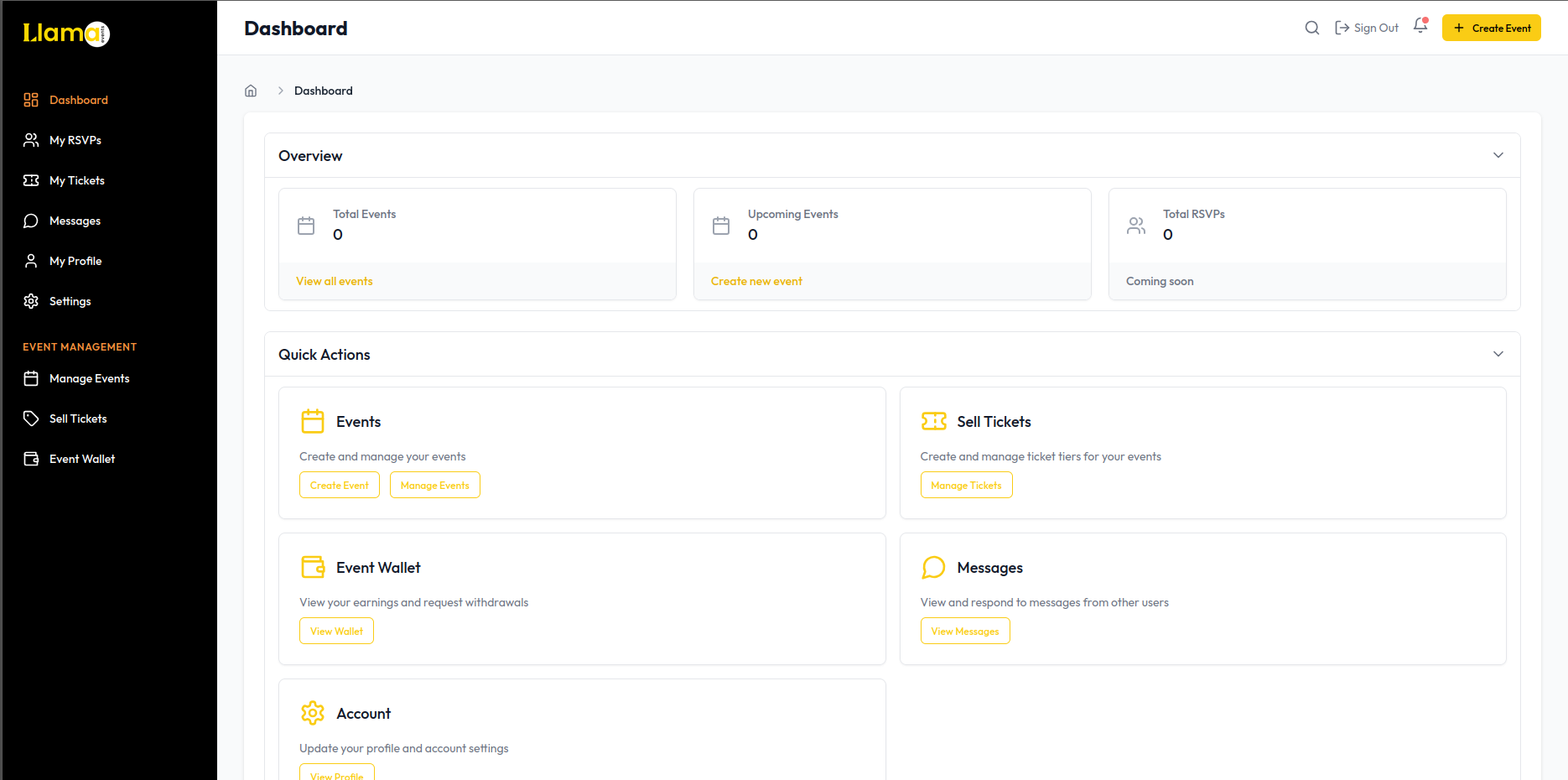
The Llama Events navigation system is divided into several key areas to help you navigate efficiently:
- Sidebar Navigation - Main menu providing access to all platform features
- Top Bar Navigation - Quick access tools and user account options
- Dashboard - Your personalized homepage with event recommendations
- Search - Global search function to find events, organizers, and venues
- Notifications - Updates about events, tickets, and platform activity
Sidebar Navigation
Dashboard
Your personalized homepage with event recommendations, upcoming events, and recent activity.
My RSVPs
Track events you've RSVP'd to, sorted by date with both upcoming and past events.
My Tickets
View, download, or manage all tickets you've purchased for events.
My Profile
Access and edit your public profile information, interests, and preferences.
Settings
Manage account settings, notification preferences, privacy controls, and security options.
Organizer Navigation
Event organizers have access to additional navigation options in the sidebar:
Manage Events
Create, edit, and control your events from one central location
Sell Tickets
Manage ticket types, pricing tiers, and inventory for your events
Event Analytics
View detailed performance metrics and attendance statistics
Event Wallet
Track earnings and process withdrawals from ticket sales
WARNING
The Organizer Navigation section is only visible after your organizer account has been approved. To become an organizer, create your first event and wait for admin approval.
Top Bar Navigation
The top navigation bar provides quick access to frequently used features:
| Feature | Icon | Function |
|---|---|---|
| Search | Find events, organizers, and venues across the platform | |
| Notifications | View recent alerts and updates about your events | |
| Profile Menu | Access account settings and quick navigation options | |
| Create Event | Quickly start the process of creating a new event |
Mobile Navigation
On mobile devices, the navigation adapts to provide an optimal experience on smaller screens:
- Menu Icon - Tap to reveal the full navigation sidebar
- Floating Action Button - Quick access to create new events
- Bottom Navigation - Access to most frequently used sections
- Search Bar - Collapsible search function to save space
- More Options - Additional functions accessible through overflow menu
Keyboard Shortcuts
For desktop users, Llama Events supports several keyboard shortcuts to enhance navigation speed:
| Shortcut | Action |
|---|---|
| Ctrl + K / ⌘ + K | Open search |
| Ctrl + D / ⌘ + D | Go to Dashboard |
| Ctrl + E / ⌘ + E | Create new event |
| Ctrl + P / ⌘ + P | Go to profile |